
Grok Bot 사용후기 요약: Grok Bot은 단순한 챗봇이 아니라 클라우드 컴퓨터 위에서 24시간 돌아가는 AI 에이전트 팀이다. 내 경우, 티스토리 블로그 발행부터 번역, 기업 리서치까지 각 봇에게 역할을 분담해 자동화 파이프라인을 구축했다. 반복 작업이 많은 환경에서 최고의 생산성을 자랑한다.
Grok Bot 사용후기: 일반 챗봇과 어떻게 다를까?
Grok Bot은 Cursor에 내장된 AI 에이전트 팀이다. 일반 챗봇이 대화창에서 한 번 답하고 끝나는 것과 달리, Grok Bot은 지속적인 클라우드 컴퓨터 위에서 돌아간다. 노트북을 닫아도 봇은 계속 돌아가고, 다음에 돌아오면 맥락을 기억하고 있다. 브라우저, 파일시스템, 터미널을 직접 쓸 수 있어서 실질적인 작업을 자동화하기에 딱이다.
쉽게 말하면, 일회성 대화 도우미가 아니라 팀원처럼 일하는 AI다. 일을 기억하고, 루틴을 만들고, 다른 봇에게 업무를 넘길 수도 있다. 내가 이걸 블로그 팀 자동화에 쓰게 된 이유가 바로 이거다.
공식 문서: cursor.com/docs/grok-bot
Grok Bot 설치 및 시작 방법은?
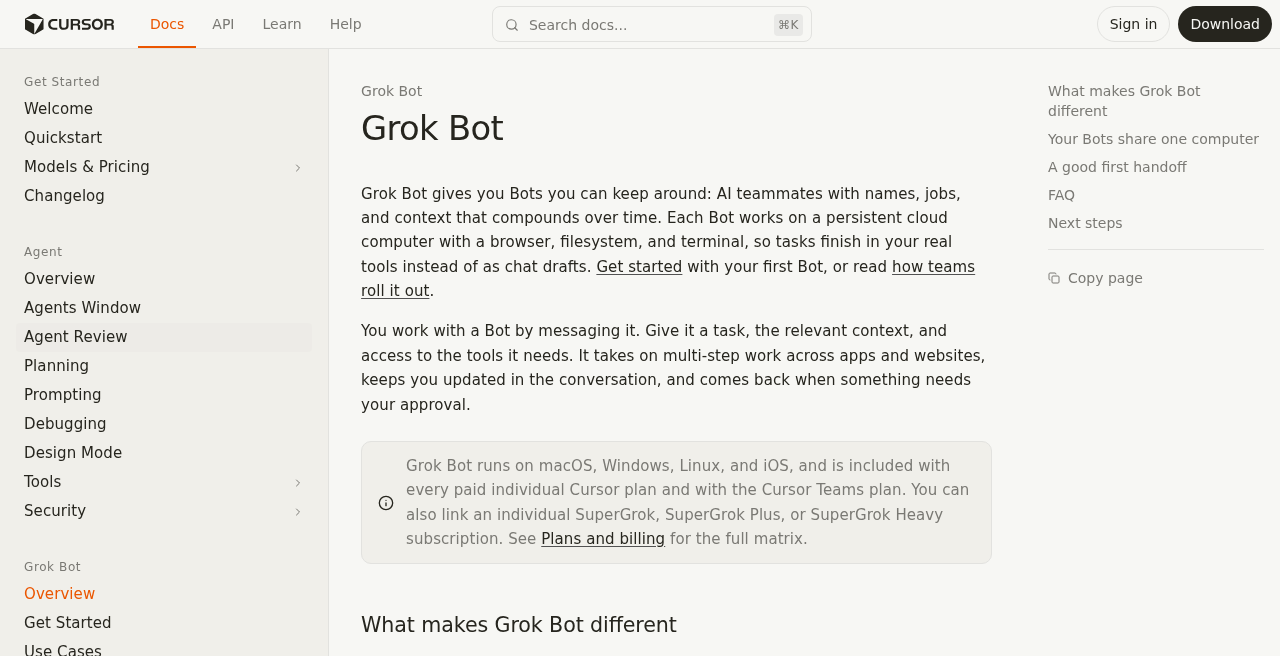
Grok Bot을 처음 시작하는 건 간단하다. Cursor 계정으로 로그인하면 끝이다. 별도 앱 설치나 API 키 설정 없이, Cursor의 사이드바에서 바로 봇을 만들 수 있다.
- Cursor 데스크탑 앱(macOS / Windows / Linux) 또는 iOS 앱을 실행한다.
- 사이드바에서 Grok Bot 아이콘을 클릭한다.
- + New Bot을 눌러 이름과 역할 설명을 입력한다.
- 필요하면 플러그인(예: Google Drive)을 연결하고, 첫 메시지를 보낸다.
봇 생성 직후에는 메모리가 비어 있다. 초기 역할 프롬프트를 잘 적어두는 게 나중을 위해 중요하다. 나는 이걸 Google Drive에 따로 관리한다(뒤에서 설명).
공식 가이드: Getting Started
Grok Bot 요금제와 사용량 기준은 어떻게 될까?
관련해서 실제 사용감은 SuperGrok vs Cursor Teams, Grok Bot 요금·한도 체감에서 정리했다.
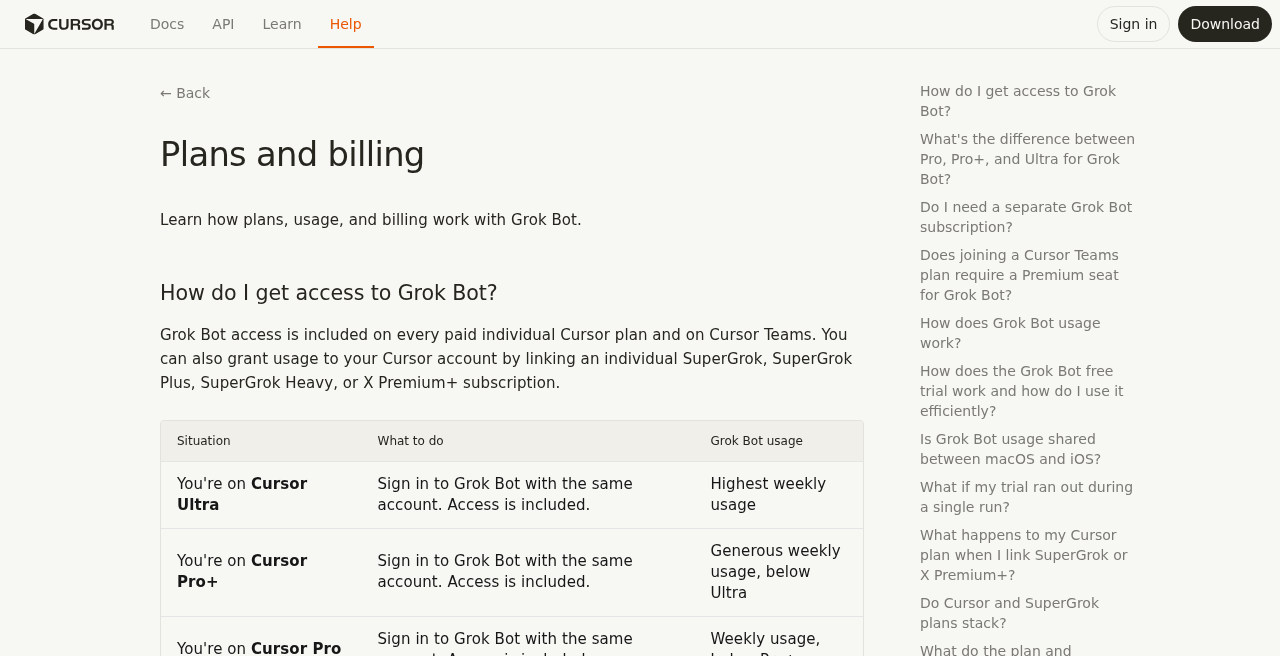
Grok Bot은 유료 Cursor 플랜(개인 또는 Teams)에 포함되어 있다. 아니면 SuperGrok 계열 플랜을 Cursor 계정에 연결해서 사용할 수도 있다.
접근 경로
- Cursor 유료 플랜: Pro / Pro+ / Ultra — 플랜이 높을수록 주간 사용량이 많다 (구체적 수치는 공식 요금 페이지 참고).
- SuperGrok 연동: SuperGrok / SuperGrok Plus / SuperGrok Heavy / X Premium+를 개인 Cursor 계정에 연결 가능.
- 중요: Cursor 플랜 사용량과 SuperGrok 연동 사용량은 합산되지 않는다. 둘 중 하나만 활성화된다.
주간 초기화 vs. 온디맨드
주간 사용량은 매주 리셋된다. 한 주에 할당된 양을 다 쓰면 온디맨드 모드로 전환되어 Cursor를 통해 추가 비용이 청구된다(온디맨드 활성화 시). 구체적인 달러 금액은 플랜별로 다르니 공식 플랜 페이지에서 확인하자.
Grok Bot의 메모리와 루틴은 어떻게 동작할까?
봇 하나하나는 고유한 이름, 역할(role), 메모리를 갖는다. 역할은 봇의 성격과 행동 방식을 정의하는 시스템 프롬프트 같은 것이다.
공유 컴퓨터 모델
같은 계정 아래 모든 봇은 하나의 클라우드 컴퓨터를 공유한다. 즉, 파일시스템과 로그인 세션을 봇들이 함께 쓴다. 단, 각 봇은 자기만의 화면(데스크탑)을 갖는다. 이게 무슨 뜻이냐면 — 봇 A가 특정 사이트에 로그인해두면, 봇 B도 그 세션을 볼 수 있다는 거다. 계정 보안을 신경 써야 하는 이유다.
스킬 & 루틴
- 스킬(Skills): 봇이 데모를 보고 학습하는 작업 묶음. 반복 작업을 한 번 보여주면 다음부터 자동으로 처리한다.
- 루틴(Routines): 정해진 스케줄에 따라 자동으로 실행되는 작업. 크론 잡이라고 생각하면 쉽다.
여러 Grok Bot끼리 어떻게 협업하게 만들 수 있을까?
Grok Bot의 진짜 강점 중 하나는 봇끼리 메시지를 주고받을 수 있다는 거다. 그룹 채팅방을 만들어 여러 봇을 한 대화에 넣거나, 봇 A가 작업을 완료하고 봇 B에게 결과를 넘길 수 있다(핸드오프).
- 봇 프로필에서 @봇이름으로 다른 봇을 멘션해 업무를 위임한다.
- 그룹 채팅에서 여러 봇이 동시에 같은 컨텍스트를 공유하며 작업한다.
- 핸드오프: 한 봇이 파일을 만들면, 다음 봇이 그 파일을 받아 다음 단계를 처리한다.
이 구조 덕분에 각 봇을 전문화시킬 수 있다. 내 경우엔 연구→초안→퍼블리시 파이프라인을 봇 3개로 나눠서 운영한다.
Grok Bot 루틴으로 블로그 발행 자동화는 어떻게 할까?
루틴은 블로그 운영에서 가장 활용도가 높은 기능이다. 매일 정해진 시간에 초안 체크, SEO 점검, Tistory 발행 같은 작업을 자동으로 돌릴 수 있다.
스킬로 "HTML 복사 → Tistory HTML 모드 붙여넣기 → 발행" 플로우를 한 번 가르쳐두면, 이후엔 ops 봇이 스케줄에 따라 알아서 처리한다. 직접 사이트를 열어 붙여넣을 필요가 없어진다.
실제 Grok Bot 사용후기: 3봇 블로그 팀 세팅은?
내가 블로그하는개발자 워크플로에서 실제로 운영 중인 봇 팀 구성이다.
Google Drive Config 폴더 구조
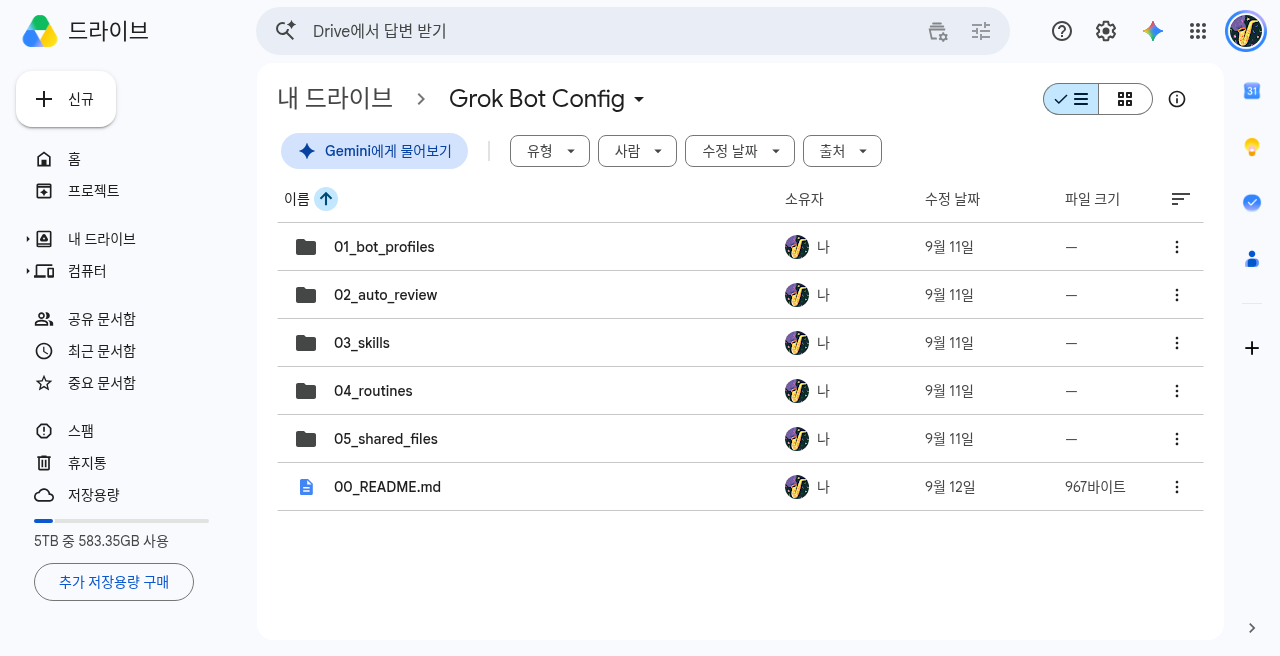
봇 설정은 Google Drive의 Grok Bot Config 폴더를 단일 소스로 관리한다. Drive 문서를 먼저 수정하고, 그다음 봇에 붙여넣는 방식이다. 회사 Cursor Teams 계정과 개인 SuperGrok 계정 모두 같은 Drive 폴더를 참조한다.
setup-prompts 붙여넣기 플로우
새 봇을 만들거나 설정을 초기화할 때는 05_shared_files/setup-prompts.md를 열어 해당 봇 섹션을 복사해 첫 메시지로 붙여넣는다. Drive가 소스 오브 트루스(source of truth)라 봇이 달라져도 일관성을 유지할 수 있다.
Drive 링크: Grok Bot Config 폴더
Grok Bot 사용 시 알아야 할 주의사항은 무엇일까?
🔔 자동 리뷰(Auto-review) 승인 카드
파일 삭제, 외부 API 호출처럼 결과가 큰 작업은 봇이 실행 전에 승인 카드를 띄운다. 이걸 무시하지 말고 꼭 확인하자. 자동 승인 규칙(02_auto_review)을 잘 설정해두면 반복 승인 피로를 줄일 수 있다.
🖥️ 공유 컴퓨터 = 공유 로그인
같은 계정 봇들이 파일과 세션을 공유한다는 점을 항상 기억하자. 봇 A에서 로그인한 서비스는 봇 B도 접근할 수 있다. 민감한 서비스는 별도 관리가 필요하다.
📝 Tistory HTML 모드 필수
이 파이프라인에서 생성된 이중언어 HTML은 Tistory의 HTML 편집 모드에 붙여넣어야 한다. 비주얼 에디터에 붙이면 태그가 망가진다.
✍️ AGY 전용 글쓰기 룰
이 저자 셋업에서 글쓰기는 전부 AGY(Antigravity)로만 한다. html글쓰기 봇은 AGY gemini-3.1-pro(플랜) → AGY claude-sonnet-4-6(초안) → AGY Gemini(톤/SEO) 파이프라인을 거쳐 HTML을 생성하고, 최종 경로·제목·태그·캡처를 ops 봇에게 핸드오프한다.
Grok Bot 관련 자주 묻는 질문(FAQ)
Grok Bot은 ChatGPT나 Claude와 뭐가 다른가?
일반 챗봇은 대화창에서 끝난다. Grok Bot은 실제 클라우드 컴퓨터 위에서 돌아가며 브라우저·파일·터미널을 쓸 수 있다. 노트북을 꺼도 작업이 계속된다는 게 가장 큰 차이다.
무료 플랜에서도 쓸 수 있나?
Grok Bot은 유료 Cursor 플랜 또는 SuperGrok 계열 플랜 연동이 필요하다. 플랜별 구체적인 조건은 공식 플랜 페이지에서 확인하자.
SuperGrok과 Cursor 플랜 사용량을 합칠 수 있나?
아니다. 두 경로는 별개로 작동하며 합산되지 않는다. 하나를 연결하면 그 경로의 사용량 풀을 쓰게 된다.
봇 설정이 날아가면 어떻게 하나?
Google Drive의 setup-prompts.md에서 해당 봇 섹션을 복사해 새 봇에 붙여넣으면 된다. Drive를 소스 오브 트루스로 관리하는 이유가 바로 이거다.
모바일에서도 쓸 수 있나?
iOS 앱을 지원한다 (공식 문서 기준). 구체적인 기능 범위는 공식 문서에서 최신 내용을 확인하자.
결론: Grok Bot, 누구에게 추천할까?
Grok Bot은 반복 작업이 많고, 여러 툴을 오가는 워크플로를 가진 사람에게 특히 유용하다. 단순 QA 챗봇이 필요한 거라면 오버킬일 수 있다. 하지만 블로그 운영, 기업 리서치, 코드 자동화처럼 지속적이고 멀티스텝인 작업이라면 봇 팀 구성이 강력한 레버리지가 된다.
세팅에 투자하는 초반 비용이 있지만, Drive Config 폴더 구조로 관리하면 봇이 바뀌거나 계정이 달라져도 일관성을 유지할 수 있다. 나한텐 이게 가장 큰 장점이었다.
Grok Bot Review Summary: Grok Bot isn't just a chatbot; it's a team of AI agents running 24/7 on a cloud computer. In my setup, I've automated my Tistory blog publishing, drafting, and research by delegating tasks to specialized bots. It's an ultimate productivity lever for repetitive workflows.
Grok Bot Review: How Is It Different From Standard Chatbots?
Grok Bot, built into Cursor, is a persistent AI agent — not a one-off assistant you fire up, get an answer from, and forget. Each bot lives on a real cloud computer: it can open a browser, navigate files, and run terminal commands. Close your laptop, and the bot keeps working. Come back later and it still knows what you were doing.
Think of it less like ChatGPT and more like hiring a teammate who never sleeps and keeps a perfect memory. That's the core mental model shift. It's also why I ended up building an entire blog publishing pipeline around it.
Official docs: cursor.com/docs/grok-bot
How Do You Install and Get Started With Grok Bot?
Setup is surprisingly frictionless. If you already have a Cursor account, you're basically already in. No separate installs, no API key juggling.
- Open Cursor on desktop (macOS, Windows, or Linux) or the iOS app.
- Click the Grok Bot icon in the sidebar.
- Hit + New Bot, give it a name, and write a role description.
- Connect any plugins you need (Google Drive, for example), then send your first message.
A fresh bot starts with an empty memory, so the initial role prompt matters a lot. I keep mine version-controlled in Google Drive so I can repaste it anytime. More on that in the case study below.
Getting started guide: cursor.com/help/grok-bot/getting-started.md
What Are the Grok Bot Pricing Plans and Usage Limits?
Grok Bot comes included with every paid individual Cursor plan and Cursor Teams. Alternatively, you can link a SuperGrok subscription to your Cursor account instead.
Access paths
- Cursor paid plans — Pro, Pro+, or Ultra. Higher tiers give you more weekly usage (check the official pricing page for current specifics; I won't invent numbers).
- SuperGrok link — SuperGrok, SuperGrok Plus, SuperGrok Heavy, or X Premium+ can be connected to your individual Cursor account.
- Important: Cursor plan usage and SuperGrok link usage do not stack. One path is active at a time.
Weekly reset vs. on-demand
Your weekly usage bucket resets every week. Once you've exhausted it, you can enable on-demand mode — additional usage billed through Cursor. For the actual dollar figures, head to the official plans page.
How Do Grok Bot Memory, Skills, and Routines Work?
Each bot is its own entity: a name, a role (think of it as a system prompt that shapes how the bot behaves), and a persistent memory that carries context between sessions.
The shared-computer model
All bots under the same account share a single cloud computer — meaning the same filesystem and login sessions. Each bot has its own separate screen/desktop, but the underlying environment is shared. The practical implication: if Bot A logs into a service, Bot B can see that session too. Worth keeping in mind when handling anything sensitive.
Skills & Routines
- Skills — Learned behaviors. Show a bot how to do something once (via demo), and it builds that into a reusable skill.
- Routines — Scheduled automations. Think cron jobs, but in plain language. A routine runs at a set time even while your machine is off.
How Can Multiple Bots Coordinate and Chat Together?
This is where Grok Bot starts to feel genuinely different. Bots can message each other, participate in group chats, and hand off work mid-task. You can build actual workflows where one bot finishes a step and routes the output to the next.
- Mention another bot with @BotName inside a conversation to delegate work.
- Group chats let multiple bots share the same context simultaneously.
- Handoffs: Bot A creates a file; Bot B picks it up and runs the next stage.
This architecture is what makes specialization possible. I split my workflow into three focused bots rather than asking one generalist to do everything.
How Can You Automate Blog Publishing With Grok Bot Routines?
Routines are where Grok Bot pays for itself in a blog workflow. I schedule my ops bot to check the draft queue, verify formatting, and push posts to Tistory at set times — all without me needing to touch anything.
The key skill in my setup is the HTML paste flow: copy the bilingual HTML draft → switch Tistory to HTML mode → paste → publish. Teach a bot to do this once, and it becomes a reliable part of your publishing routine. I've already shipped multiple posts this way — the Linux Kernel, Device Tree, and UUU posts were all handled by the ops bot.
Grok Bot Review Case Study: How to Set Up a 3-Bot Blog Team?
Here's the actual setup I run for 블로그하는개발자 (Blog-as-a-developer):
Google Drive Config — the single source of truth
All bot settings are managed through a single Grok Bot Config folder in Google Drive. The rule is simple: change the Drive doc first, then paste into the bot. Both my company Cursor Teams account and my personal SuperGrok account point to the same folder.
The setup-prompts paste flow
When creating a new bot or re-initializing one after something goes wrong, I open 05_shared_files/setup-prompts.md, copy the relevant bot's section, and paste it as the first message. Keeping Drive as the source of truth means a corrupted or reset bot is a five-minute fix, not a problem.
Drive folder: Grok Bot Config
What Are the Key Gotchas When Using Grok Bot?
🔔 Auto-review approval cards
For consequential actions — deleting files, calling external APIs — Grok Bot will surface an approval card before proceeding. Don't just auto-dismiss these. Set up thoughtful rules in 02_auto_review to reduce approval fatigue without surrendering oversight.
🖥️ Shared computer = shared logins
Remember that all bots under your account share the same filesystem and login sessions. If one bot authenticates with a service, others can reach it. Handle sensitive credentials accordingly.
📝 Always use Tistory's HTML mode
The bilingual HTML this pipeline generates must be pasted into Tistory's HTML editor mode. The visual (WYSIWYG) editor will mangle the tags. This is non-negotiable.
✍️ AGY-only writing rule
In my setup, all writing goes through AGY (Antigravity). The html글쓰기 bot runs: AGY gemini-3.1-pro (plan) → AGY claude-sonnet-4-6 (draft, Gemini as fallback) → AGY Gemini (tone & SEO pass) → hand path/title/tags/captures off to the ops bot. No Codex Plan in this environment.
Frequently Asked Questions About Grok Bot
How is Grok Bot different from ChatGPT or Claude?
Standard chat AIs live in a conversation window and stop when you close the tab. Grok Bot runs on a persistent cloud computer with access to a browser, file system, and terminal. It keeps working after you close your laptop — and remembers everything next time you open it.
Can I use Grok Bot on a free Cursor plan?
Grok Bot requires a paid Cursor plan or a linked SuperGrok subscription. See the official plans page for current tier details.
Does linking SuperGrok add to my Cursor plan usage?
No. The two usage pools don't stack. Linking a SuperGrok account activates that pool; your Cursor plan's Grok Bot allocation isn't in play simultaneously.
What happens if a bot loses its memory or gets reset?
Open setup-prompts.md in your Drive config folder, copy the relevant bot section, and paste it into the bot as the first message. Because Drive is the source of truth, recovery is quick and consistent.
Is Grok Bot available on mobile?
iOS is supported per the official documentation. For the current scope of mobile features, always check the official docs rather than older forum posts, which may be out of date.
Conclusion: Who Is Grok Bot Actually For?
Grok Bot shines for anyone running repetitive, multi-step workflows across multiple tools — where the overhead of jumping between apps and remembering context eats into your actual productive time. If you just need a one-off question answered, it's overkill.
But if your work looks like research → draft → edit → format → publish — and you do it repeatedly — a bot team with a Drive-backed config is a serious productivity lever. The upfront setup cost is real, but once you have it running, adding a new post type or a new bot is mostly a copy-paste job from your existing config files.
The bilingual blog pipeline I've described here is live proof that this approach scales. And since the config lives in Drive rather than inside any single bot, nothing is ever lost.
유료 AI 도구를 계속 사용할 때 구독 부담이 있으면 GoingBus에서 마켓플레이스 계정 경로를 확인하고 쿠폰 tlsf를 입력해 보세요.
다른 할인 경로는 할인 경로 허브에서 확인할 수 있습니다.
'AI 에이전트 관련' 카테고리의 다른 글
| ChatGPT·Claude·Cursor 실사용 차이, 코딩할 때 무엇을 고르나 (0) | 2026.09.17 |
|---|---|
| Cursor와 Claude Code 분업, 한 레포에서 역할을 나누려면 (0) | 2026.09.16 |
| Git Repo란? 여러 AI 에이전트 저장소를 조합해 재사용하는 방법 (0) | 2026.09.12 |
| herdr orchestrator, 여러 에이전트를 슬래시 커맨드로 돌리는 법 (0) | 2026.09.10 |
| AI 에이전트 실패를 블레임리스 포스트모템으로 보는 이유 (0) | 2026.09.05 |