
🇰🇷 한국어 | 🇺🇸 English
Docker의 overlay2는 OverlayFS를 기반으로 이미지의 읽기 전용 레이어(lowerdir)와 컨테이너 쓰기 레이어(upperdir)를 합쳐 하나의 통합된 마운트(merged) 뷰로 보여줍니다. 컨테이너 내부에서 발생한 쓰기 작업은 기본적으로 원본 이미지에 남지 않으며, 컨테이너 삭제 시 쓰기 레이어도 함께 영구적으로 삭제됩니다. 이 글은 Docker 시리즈의 세 번째
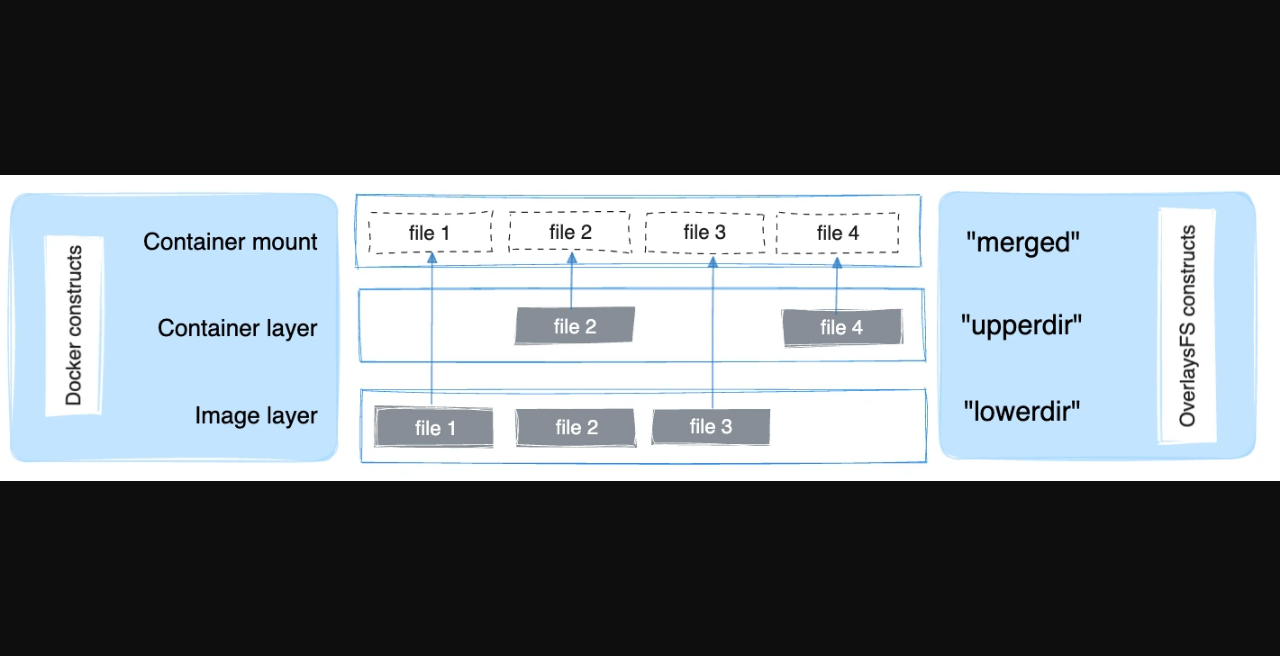
로, 공식 스토리지 드라이버 문서를 기준으로 컨테이너 레이어가 디스크에서 어떻게 통합되는지를 살펴봅니다.
스토리지 드라이버와 이미지 레이어는 어떤 관계인가?
한 줄 답: 스토리지 드라이버는 이미지를 구성하는 여러 겹의 읽기 전용 레이어를 관리하고, 컨테이너 생성 시 새로운 쓰기 레이어를 추가하여 통합된 파일시스템 뷰를 제공합니다.
Docker 이미지는 단일 파일이 아니라 여러 겹의 읽기 전용 레이어(stacked read-only layers)가 순서대로 쌓인 구조입니다. Dockerfile의 각 명령어(예: FROM, RUN, COPY)는 이미지 빌드 시점에 독립적인 레이어를 만들어 냅니다. 이 레이어들은 변경 불가능(immutable)하며, 이미지를 공유하는 여러 컨테이너가 동일한 레이어를 참조할 수 있습니다.
스토리지 드라이버는 이러한 레이어 구조를 추상화하여 컨테이너 런타임에 단일 파일시스템처럼 보이게 하는 역할을 담당합니다. 공식 문서에 따르면 컨테이너가 생성될 때 스토리지 드라이버는 읽기 전용 이미지 레이어 위에 새로운 쓰기 가능 레이어(new writable layer, 이하 쓰기 레이어 또는 upper)를 추가합니다. 컨테이너가 보는 파일시스템은 이 쓰기 레이어와 이미지 레이어 전체가 통합된 뷰입니다.
Linux 커널이 지원하는 OverlayFS를 활용하는 Docker overlay2는 현재 공식 문서에서 Linux 호스트에 널리 사용되는 스토리지 드라이버입니다. overlay2는 이미지 레이어들을 lowerdir로, 컨테이너 쓰기 레이어를 upperdir로 구성하여 merged 마운트 포인트를 통해 컨테이너에 통합 뷰를 제공합니다. 각 용어의 의미는 다음 섹션에서 자세히 다룹니다.
스토리지 드라이버가 레이어를 올바르게 관리하기 때문에, 2편에서 살펴본 docker load로 복원된 이미지이든 docker pull로 내려받은 이미지이든, 컨테이너 생성 과정은 동일한 경로를 따릅니다.
overlay2의 lowerdir·upperdir·merged·workdir은 각각 무엇인가?
한 줄 답: lowerdir은 읽기 전용 이미지 레이어, upperdir은 컨테이너 전용 쓰기 레이어, merged는 컨테이너가 실제로 보는 통합 뷰, workdir은 OverlayFS 내부 작업을 위한 디렉터리입니다.
OverlayFS는 여러 디렉터리를 겹쳐서(overlay) 하나의 통합된 파일시스템 뷰를 제공하는 Linux 커널 파일시스템입니다. overlay2에서는 다음 네 가지 구성 요소가 사용됩니다.
구성 요소 역할 읽기/쓰기| lowerdir | 이미지를 구성하는 읽기 전용 레이어들. 여러 개의 레이어를 쌓을 수 있으며(다중 lower 지원), 컨테이너 내에서 수정할 수 없습니다. | 읽기 전용 |
| upperdir | 컨테이너 생성 시 새로 만들어지는 쓰기 레이어. 컨테이너 내부에서 발생하는 모든 파일 변경(생성·수정·삭제)이 이 레이어에 기록됩니다. | 읽기·쓰기 |
| merged | lowerdir과 upperdir을 합쳐 컨테이너가 바라보는 통합 파일시스템 뷰. 컨테이너의 루트 파일시스템(/)에 해당합니다. | 통합 뷰 |
| workdir | OverlayFS가 copy-up 등 내부 작업을 처리하기 위해 요구하는 임시 작업 디렉터리. 컨테이너 사용자에게는 직접 노출되지 않습니다. | 내부 전용 |
컨테이너 관점에서 merged는 하나의 완전한 파일시스템처럼 보입니다. upperdir에 동일한 경로의 파일이 존재하면 lowerdir의 파일보다 우선합니다. upperdir에 없는 파일은 lowerdir에서 투명하게 읽혀 옵니다.
이미지 레이어가 여러 겹일 때, 각 레이어는 lowerdir에 순서대로 나열됩니다. overlay2는 다중 lower 레이어를 지원하므로, 여러 단계로 빌드된 이미지라도 하나의 OverlayFS 마운트로 표현할 수 있습니다.
참고: Docker Engine 29 이상에서는 containerd image store(snapshotter)가 기본으로 사용될 수 있습니다. 이 경우 레이어 스택의 개념은 동일하지만, 실제 경로나 관리 명령이 다를 수 있습니다. 이 글의 설명은 공식 문서의 classic overlay2 기준을 따릅니다.
copy-on-write는 파일을 수정할 때 무엇을 하나?
한 줄 답: lowerdir(이미지 레이어)에만 존재하는 파일을 수정하면 OverlayFS가 먼저 그 파일을 upperdir로 복사(copy-up)한 뒤 수정하며, 파일 삭제는 whiteout 파일로 lowerdir의 파일을 가리는 방식으로 처리합니다.
copy-on-write(CoW)는 읽기 전용 레이어를 보호하면서 쓰기를 가능하게 하는 핵심 메커니즘입니다. overlay2에서 CoW는 다음과 같이 동작합니다.
파일 수정: copy-up
컨테이너가 lowerdir에만 존재하는 파일을 처음으로 수정하려고 할 때, OverlayFS는 다음 과정을 수행합니다.
- lowerdir에서 해당 파일 전체를 upperdir로 복사합니다(copy-up).
- 이후 수정은 upperdir에 복사된 파일에 대해 이루어집니다.
- lowerdir의 원본 파일은 변경되지 않고 그대로 유지됩니다.
copy-up은 파일 크기에 비례한 초기 비용이 발생하지만, 이후 같은 파일에 대한 반복 쓰기는 upperdir에서만 이루어집니다. 공식 문서는 이 초기 복사 비용이 write-heavy 워크로드에서 성능에 영향을 줄 수 있음을 언급합니다.
파일 삭제: whiteout
컨테이너가 lowerdir에 있는 파일을 삭제하면, OverlayFS는 lowerdir의 원본 파일을 실제로 지우지 않습니다. 대신 upperdir에 whiteout이라는 특수 파일(또는 디렉터리의 경우 opaque 속성)을 생성하여, merged 뷰에서 해당 경로의 파일이 보이지 않도록 가립니다. 이 방식으로 읽기 전용 이미지 레이어의 불변성이 유지됩니다.
새 파일 생성
컨테이너가 새 파일을 생성하면, 해당 파일은 copy-up 없이 곧바로 upperdir에 생성됩니다.
여러 컨테이너가 같은 이미지를 쓰면 디스크는 어떻게 공유되나?
한 줄 답: 동일한 이미지 기반의 여러 컨테이너는 공통 이미지 레이어(lowerdir)를 호스트에서 공유하고, 각 컨테이너는 자신만의 얇은 upperdir만 별도로 생성합니다.
overlay2의 레이어 공유 방식은 디스크 공간과 이미지 pull 비용을 크게 줄여줍니다. 예를 들어 동일한 기반 이미지를 사용하는 컨테이너 10개를 실행한다고 가정합니다.
- 이미지 레이어(lowerdir): 기반 이미지의 모든 레이어는 호스트에 단 한 벌만 저장됩니다. 10개의 컨테이너가 이 레이어들을 동시에 참조하더라도, 디스크에는 이미지 데이터의 복사본이 추가로 생성되지 않습니다.
- 컨테이너 쓰기 레이어(upperdir): 각 컨테이너는 자신만의 upperdir을 생성합니다. 컨테이너가 아무것도 쓰지 않았다면 upperdir은 거의 비어 있으며, 실제로 수정된 파일의 copy-up 결과만 upperdir에 누적됩니다.
공식 스토리지 드라이버 문서에 따르면, 이 레이어 공유 덕분에 동일한 베이스 이미지로 여러 컨테이너를 운영할 때 디스크 사용량이 컨테이너 수에 비례하여 증가하지 않습니다. 이미지 pull 시에도 이미 로컬에 존재하는 레이어는 다시 내려받지 않으므로, 네트워크 비용 역시 절감됩니다.
이 공유 구조는 lowerdir가 읽기 전용이기 때문에 가능합니다. 어떤 컨테이너도 lowerdir를 직접 수정할 수 없으므로, 모든 컨테이너가 동일한 lowerdir을 안전하게 참조할 수 있습니다.
쓰기 많은 데이터를 overlay 쓰기 레이어에 두면 왜 문제인가?
한 줄 답: 컨테이너 삭제 시 upperdir(쓰기 레이어)도 함께 영구 삭제되며, write-heavy 워크로드를 쓰기 레이어에 두면 copy-up 비용으로 인해 성능이 저하될 수 있습니다. 영속 데이터와 I/O가 많은 데이터는 volume 또는 bind mount를 사용해야 합니다.
컨테이너 삭제 시 쓰기 레이어는 사라집니다
컨테이너를 docker rm으로 삭제하면, 해당 컨테이너의 upperdir과 그 안에 누적된 모든 쓰기 데이터도 함께 삭제됩니다. 이미지 레이어(lowerdir)는 영향을 받지 않습니다. 즉, 컨테이너 실행 중에 쓰기 레이어에 저장한 데이터는 컨테이너가 삭제되는 순간 복구 불가능하게 사라집니다. 이것은 overlay2의 설계 의도이며, 이미지 레이어의 불변성을 보장하기 위한 구조입니다.
write-heavy 워크로드의 성능 문제
공식 Docker 스토리지 드라이버 문서는 write-heavy 워크로드를 컨테이너의 쓰기 레이어에 두지 말 것을 권고합니다. 그 이유는 다음과 같습니다.
- copy-up 비용: 처음 수정하는 파일은 lowerdir에서 upperdir로 전체 복사(copy-up)가 선행됩니다. 파일이 클수록 이 비용이 커집니다.
- 레이어 탐색 오버헤드: 파일 조회 시 OverlayFS는 upperdir과 여러 lowerdir을 순서대로 탐색합니다. 레이어가 많을수록 탐색 경로가 길어집니다.
영속 데이터는 volume 또는 bind mount를 사용해야 합니다
데이터베이스 파일, 로그, 캐시처럼 영속성이 필요하거나 I/O가 잦은 데이터는 컨테이너의 쓰기 레이어 대신 Docker volume 또는 bind mount를 사용해야 합니다. volume과 bind mount는 컨테이너 파일시스템(overlay)을 거치지 않고 호스트 파일시스템에 직접 읽고 씁니다. 컨테이너가 삭제되어도 volume의 데이터는 유지됩니다.
volume과 bind mount의 구체적인 사용법과 레이어 캐시 활용 전략은 이 시리즈의 4편에서 다룹니다. 이 편에서는 "overlay 쓰기 레이어는 임시 레이어이므로 영속 데이터는 반드시 외부 마운트로 분리해야 한다"는 원칙만 기억해 두시기 바랍니다.
FAQ
한 줄 답: overlay2 스토리지 드라이버와 관련하여 자주 묻는 질문을 정리합니다.
질문 답변| 현재 사용 중인 스토리지 드라이버는 어떻게 확인하나요? | docker info 명령어를 실행하면 Storage Driver 항목에서 현재 사용 중인 드라이버(예: overlay2)를 확인할 수 있습니다. |
| 스토리지 드라이버를 변경하면 어떤 점을 주의해야 하나요? | 드라이버를 변경하면 기존 드라이버로 관리되던 로컬 이미지와 컨테이너에 접근할 수 없게 될 수 있습니다. 드라이버 변경 전에 필요한 이미지를 docker save로 백업해 두는 것이 권장됩니다(2편 참조). 변경 절차는 공식 문서 및 호스트 환경에 따라 다르므로 사전에 확인이 필요합니다. |
| Engine 29 이상에서는 overlay2 경로가 다를 수 있나요? | Docker Engine 29 이상에서 containerd image store(snapshotter)를 사용하는 경우, 이미지와 레이어 관리 경로·명령이 classic overlay2와 다를 수 있습니다. 레이어를 스택으로 쌓는 개념은 동일하지만, 실제 경로와 운영 방식은 환경에 따라 달라질 수 있으므로 docker info로 현재 환경을 먼저 확인하시기 바랍니다. |
| 컨테이너 안에서 쓴 파일은 이미지에 반영되나요? | 아닙니다. 컨테이너의 쓰기는 upperdir(쓰기 레이어)에만 기록되며, 이미지 레이어(lowerdir)는 변경되지 않습니다. 변경 사항을 이미지에 반영하려면 docker commit을 사용하거나 Dockerfile로 새 이미지를 빌드해야 합니다. |
| overlay2 외에 다른 스토리지 드라이버도 있나요? | 공식 문서에는 overlay2 외에도 btrfs, zfs, devicemapper(레거시), vfs 등의 드라이버가 언급됩니다. 그러나 Linux 호스트에서는 overlay2가 권장되는 기본 선택입니다. 드라이버 선택은 호스트 파일시스템과 커널 버전에 따라 달라집니다. |
출처
한 줄 답: 본문 사실은 2026-09-14 기준으로 확인한 Docker 공식 스토리지 드라이버 문서를 사용합니다.
- Use the OverlayFS storage driver — Docker Docs — overlay2의 lowerdir·upperdir·merged·workdir 용어, copy-up, whiteout, 레이어 공유 동작을 확인했습니다.
- Storage drivers overview — Docker Docs — 스토리지 드라이버 역할, copy-on-write 개요, write-heavy 워크로드에 대한 volume 사용 권고를 확인했습니다.
- Manage data in Docker — Docker Docs — 컨테이너 스토리지 전반 및 volume·bind mount 개요를 참조했습니다.
이 글은 Docker 공식 스토리지 드라이버 문서를 기준으로 한 일반 안내이며, Docker Engine 버전·containerd image store 사용 여부·호스트 파일시스템에 따라 실제 경로와 관리 명령은 달라질 수 있습니다.
Docker's overlay2 uses OverlayFS to combine read-only image layers (lowerdir) with a container-specific writable layer (upperdir) into a single unified mount point (merged) that the container uses as its root filesystem. Writes that occur inside a container do not persist to the underlying image, and when a container is removed, its writable layer is permanently destroyed along with it. This is part 3 of 4 in the Docker series, covering how container and image layers are combined on disk based on official storage driver documentation. Part 2 covered docker load, docker save, and docker run; part 4 will address layer caching, volumes, and bind mounts in practice.
What is the relationship between the storage driver and image layers?
Short answer: The storage driver manages the stacked read-only layers that make up an image and adds a new writable layer on top when a container is created, presenting a unified filesystem view to the container.
A Docker image is not a single flat file. It is a stack of immutable, read-only layers, where each layer corresponds to an instruction in the Dockerfile (such as FROM, RUN, or COPY). Because these layers are read-only, they can be safely shared between multiple containers that use the same base image.
The storage driver is the component responsible for managing this layer stack and presenting it to the container runtime as a single coherent filesystem. When a container is created, the storage driver adds a new writable layer on top of the read-only image layers. The container then sees a merged view of all those layers.
Docker overlay2 is the storage driver that leverages the Linux kernel's OverlayFS filesystem. It is the widely-used default driver on Linux hosts according to the official documentation. overlay2 represents image layers as the lowerdir and the container's writable layer as the upperdir, then exposes the merged mountpoint as the container's root filesystem.
Regardless of how an image was obtained — whether via docker pull, docker load (covered in part 2), or a local build — the storage driver applies the same layering process when a container is created.
What are lowerdir, upperdir, merged, and workdir in overlay2?
Short answer: lowerdir holds the read-only image layers, upperdir is the container's writable layer, merged is the unified view the container sees, and workdir is an internal scratch directory required by OverlayFS.
OverlayFS is a Linux kernel filesystem that overlays multiple directories into one unified view. In overlay2, four components work together to present a single filesystem to the container.
Component Role Access| lowerdir | The read-only image layers. Multiple lower layers are supported, corresponding to the stacked layers of the Docker image. The container cannot write to these layers directly. | Read-only |
| upperdir | The writable container layer created when the container starts. All file changes made inside the container (creates, modifications, deletions) are recorded here. | Read-write |
| merged | The unified view that combines the upperdir and lowerdir layers. This is the root filesystem (/) that the container process sees. | Unified view |
| workdir | An internal scratch directory required by OverlayFS to perform atomic copy-up operations. It is not directly visible to or usable by container processes. | Internal only |
From the container's perspective, the merged mountpoint looks like a complete, ordinary filesystem. If a file exists in both upperdir and lowerdir, the upperdir version takes precedence. Files that exist only in lowerdir are transparently surfaced through the merged view. This means the container can read files from the image layers without any special handling — they simply appear in place.
When an image has many layers (as built from a multi-stage or multi-instruction Dockerfile), all those layers appear as entries in the lowerdir. overlay2 supports multiple lower layers, so this multi-layer stack is represented in a single OverlayFS mount.
Note: Starting with Docker Engine 29, the containerd image store (snapshotter) may be used by default. The fundamental concept of stacked layers remains the same, but the actual paths and management commands can differ. The explanations in this article are based on the classic overlay2 model as described in the official Docker storage driver documentation.
What does copy-on-write do when a file is modified?
Short answer: When a file that exists only in the lowerdir is first modified, OverlayFS copies the entire file up to the upperdir (copy-up) before applying the modification. Deleting a file from the lowerdir creates a whiteout entry in the upperdir that hides the original without removing it from the read-only layer.
Copy-on-write (CoW) is the mechanism that allows containers to modify files from read-only image layers without altering those layers. In overlay2, CoW works as follows.
Modifying a file: copy-up
When a container process attempts to modify a file that exists only in the lowerdir, OverlayFS performs a copy-up operation before the write takes place.
- The entire file is copied from the lowerdir to the upperdir.
- The write is then applied to the copy in the upperdir.
- The original file in the lowerdir remains unchanged.
Copy-up incurs an upfront cost proportional to the size of the file being modified. However, subsequent writes to the same file go directly to the upperdir copy without any additional copy-up. The official documentation notes that this initial copy cost can affect performance for write-heavy workloads — a point addressed in the next section.
Deleting a file: whiteout
When a container deletes a file that exists in the lowerdir, OverlayFS does not modify the read-only layer. Instead, it creates a special whiteout file (or an opaque attribute for directories) in the upperdir at the same path. This whiteout entry instructs the merged view to hide the corresponding lowerdir entry, making the file appear deleted to the container. The original file in the lowerdir is never touched, preserving the layer's immutability.
Creating a new file
When a container creates a new file that does not exist in any lowerdir, the file is written directly to the upperdir without any copy-up step.
How is disk space shared when multiple containers use the same image?
Short answer: Multiple containers based on the same image share the underlying read-only image layers (lowerdir) on the host. Each container creates only its own thin upperdir, so disk usage does not multiply with the number of containers.
Layer sharing is one of the key efficiency benefits of the overlay2 storage model. Consider running ten containers from the same base image.
- Image layers (lowerdir): The image layers are stored only once on the host. All ten containers reference those same layers simultaneously. No additional copy of the image data is created on disk for each container.
- Container writable layer (upperdir): Each container gets its own upperdir. If a container writes nothing, its upperdir remains nearly empty. Only the files that have been modified or created within that specific container accumulate in its upperdir.
According to the official storage driver documentation, this sharing means that running many containers from the same image does not cause disk usage to grow linearly with the container count. Similarly, when pulling an image, any layers already present locally are not downloaded again, reducing both bandwidth and pull time.
This sharing is safe because the lowerdir is strictly read-only. No container can directly modify the image layers, so all containers can reference the same lowerdir without risk of data corruption between them.
Why is it problematic to store write-heavy data in the overlay writable layer?
Short answer: The writable layer is permanently destroyed when the container is removed, and placing write-heavy data there incurs copy-up performance overhead. Persistent or I/O-intensive data should use Docker volumes or bind mounts instead.
The writable layer is destroyed when the container is removed
When a container is removed with docker rm, its upperdir and all data written to it are permanently deleted. The image layers (lowerdir) are unaffected. This means any data written exclusively to the container's writable layer during its lifetime is irrecoverably lost when the container is removed. This is by design: the immutability of image layers depends on the writable layer being separate and disposable.
Performance overhead for write-heavy workloads
The official Docker storage driver documentation explicitly advises against placing write-heavy workloads in the container's writable layer. Two factors contribute to the performance concern.
- Copy-up cost: Every file from the lowerdir that is modified for the first time must be fully copied to the upperdir before the write can proceed. For large files, this initial copy is non-trivial.
- Layer traversal overhead: Looking up a file requires OverlayFS to search the upperdir and then each lowerdir in order. Images with many layers increase this traversal path.
Use volumes or bind mounts for persistent or I/O-intensive data
For data that must survive container removal — such as database files, application logs, or caches — or for workloads with high I/O rates, Docker volumes and bind mounts are the correct solution. Unlike the overlay writable layer, volumes and bind mounts bypass the OverlayFS stack and read and write directly to the host filesystem. Volume data persists independently of the container lifecycle.
The detailed mechanics of volumes and bind mounts, as well as layer cache strategies, are covered in part 4 of this series. The essential principle to take away from this section is: the overlay writable layer is ephemeral by design, so any data that needs to outlive the container must be placed on an external mount.
FAQ
Short answer: Common questions about the overlay2 storage driver.
Question Answer| How do I check which storage driver is currently in use? | Run docker info and look for the Storage Driver field. On a typical Linux host it will read overlay2. |
| What should I be aware of when changing the storage driver? | Changing the storage driver can make existing local images and containers inaccessible, because the new driver cannot read data stored by the previous driver. Before switching, back up any images you need using docker save (see part 2 of this series). Consult the official documentation and your host environment before making any changes. |
| On Docker Engine 29+, will the overlay2 paths look different? | Docker Engine 29 and later may use the containerd image store (snapshotter) by default. The concept of stacked layers is the same, but the actual storage paths and management commands can differ from the classic overlay2 model. Run docker info to check your current configuration before drawing conclusions about paths or layer layout. |
| Are files written inside a container reflected back to the image? | No. Writes go to the container's upperdir only. The image layers (lowerdir) are never modified. To persist changes to a new image, use docker commit or build a new image with a Dockerfile. |
| Are there storage drivers other than overlay2? | Yes. The official documentation also covers btrfs, zfs, the legacy devicemapper, and vfs. However, overlay2 is the recommended default for Linux hosts. The appropriate driver depends on the host filesystem and kernel version. |
References
Short answer: Facts in this article are drawn from Docker's official storage driver documentation checked on 2026-09-14.
- Use the OverlayFS storage driver — Docker Docs — Used to verify lowerdir, upperdir, merged, and workdir terminology, copy-up behavior, whiteout, and layer sharing.
- Storage drivers overview — Docker Docs — Used to verify the storage driver's role, the copy-on-write overview, and the official recommendation to use volumes for write-heavy workloads.
- Manage data in Docker — Docker Docs — Referenced for the overall container storage model and the introduction to volumes and bind mounts.
This article is a general overview based on Docker's official storage driver documentation. Actual paths and management commands can vary depending on the Docker Engine version, whether the containerd image store is in use, and the host filesystem.
'기타' 카테고리의 다른 글
| systemd Type= 정리|simple·exec·notify와 서비스 파일 핵심 키워드 (0) | 2026.09.17 |
|---|---|
| GoingBus 할인 받는 법, 가입·쿠폰·주의점 (0) | 2026.09.17 |
| docker load·save·run으로 보는 이미지 로드와 실행 (0) | 2026.09.16 |
| 유튜브 프리미엄 공유구독, 공식 요금부터 할인 경로까지 (0) | 2026.09.15 |
| Docker 컨테이너는 어떻게 실행되나|namespaces와 cgroups (0) | 2026.09.15 |